Setting up a MikroTik router on Fonira network
Published:

Fonira requires traffic between their modem and your router to go over a specific VLAN, as explained in the FAQ. VLAN 31, if you do not want to click the link. So, how do you set it up?
I am assuming you have a MikroTik router physically connected to Fonira's modem.
This is step zero.
I do not mean that the two devices are "talking" to each other (because
without setting up the VLAN they will not); I only mean that there is a
physical cable running between one the modem's LAN port, and
the MikroTik's uplink port.
First, go get yourself a WinBox and install it on your PC. Then, wire up Ethernet between the PC and the MikroTik, and connect to the MikroTik using WinBox.
I am assuming you are setting everything from scratch, so the Quickset box may pop up. Keep Rule 4 in mind (You do not use Quickset!) and disregard it. We are doing stuff manually, because if you are going to fuck shit up, you should at least do it with your own dirty hands.
Once you are connected to the MikroTik, you will see a menu on the left side of the GUI:
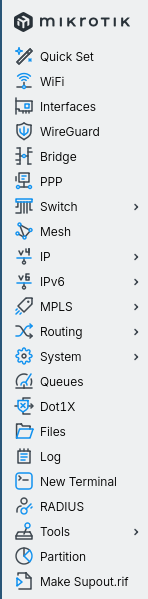
VLAN
Click on Interfaces. You will see a few of them:
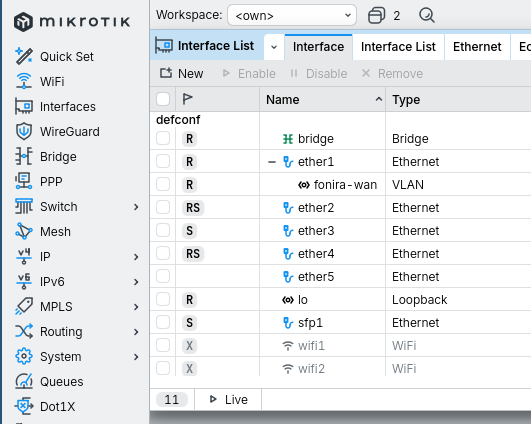
In the screenshot above, the fonira-wan VLAN interface
is already present, but you will most likely not see any VLAN interfaces
on your screen.
Click on the VLAN tab of the Interface List window to see what VLANs you have available (most likely none).
Click on New to add a new VLAN interface.
Put something descriptive in the Name field — I used
fonira-wan, but the name does not really matter as long as
it is obvious what it refers to.
In the VLAN ID field enter the VLAN ID specified by
your ISP; in Fonira's case this is 31.
Then, set the Interface for this VLAN to the uplink
interface of the MikroTik, which will most likely be
ether1.
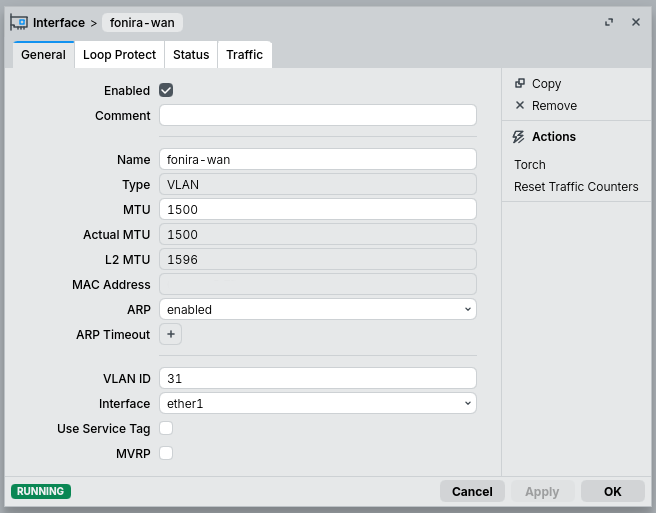
Click Apply, then OK. Reboot the router for good measure. You are done.
I shamelessly stole the above instructions from a post on MikroTik's forum.
These steps will only allow your MikroTik to "talk" to Fonira's modem. They will not give you neither IPv4 nor IPv6 (you have to enable DHCP for that), and will most likely give you an unsatisfactory firewall experience (especially on the IPv6 side). You definitely should take care of all those other things too. Setting up the proper VLAN on your uplink is a necessary, but not sufficient step on your quest to getting internet access.
Happy sailing, me mateys browsing, fellow netizens!
The Versus (VS) Graphic I used to create the cover image for this post is available under the OGA-BY 3.0 license.